
Smart Downloads. A clearer view.
Virtual kind and Date Added groups, real folder distinctions, logical sizes and a review before Tidy moves anything.
Make a little room for what matters. Beautiful folders,
useful previews, and a calmer way to explore your Mac.
macOS 27+ · Apple silicon
The preview supports browsing, local inspection and recovery of eligible operations. File-changing commands remain locked until configured activation is available. Changing files will require a valid licence.
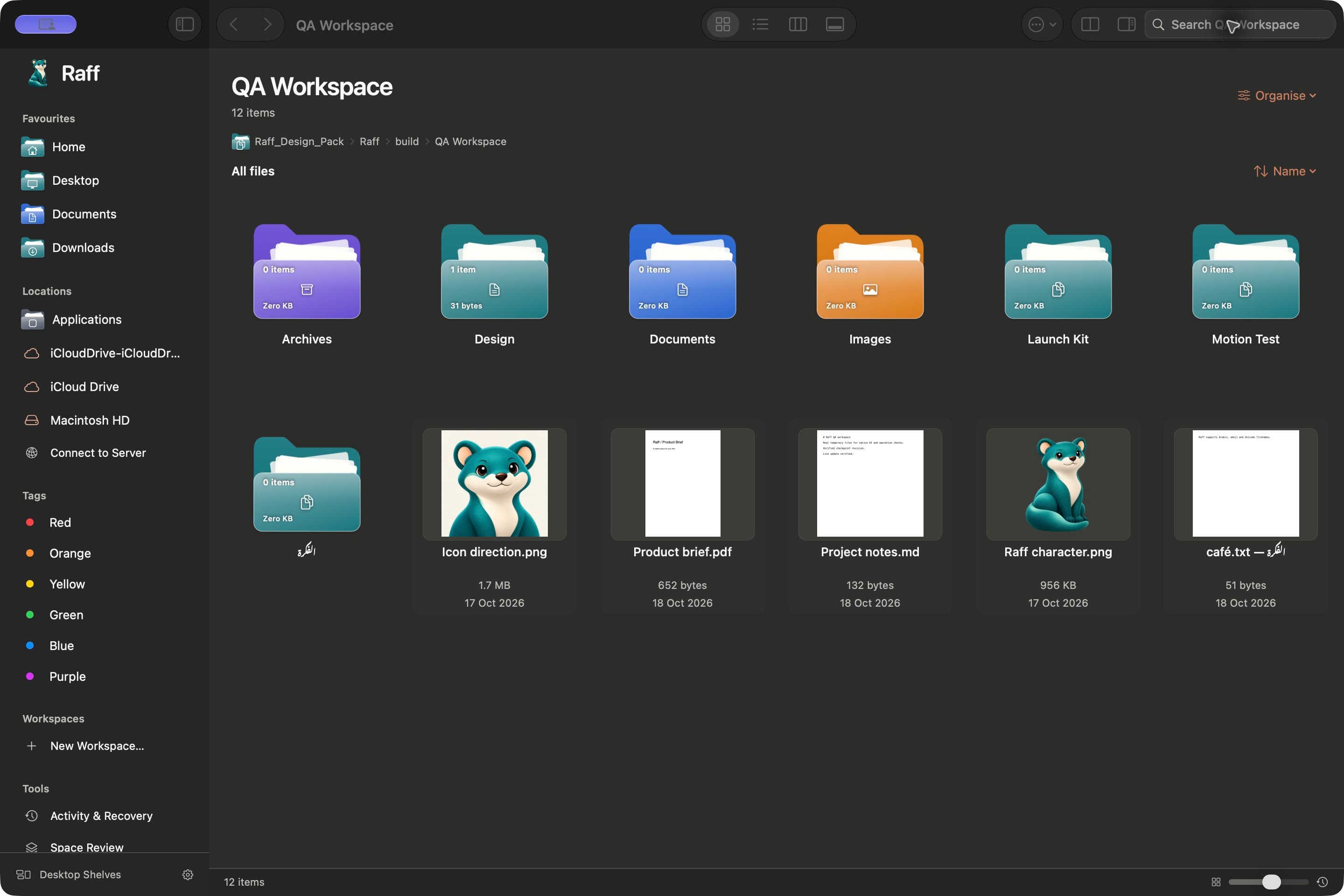
The actual native app. Your files stay in their folders.
 A little more
Fits right into your working day.
All the things you do with your files, made a little clearer.
Enough capability for a busy day. Enough calm to enjoy it.
Virtual kind and Date Added groups, real folder distinctions, logical sizes and a review before Tidy moves anything.
Useful previews, real folder details and Quick Look, a tap of the space bar away.
Gather references from different folders into a workspace. Every original stays in place.
Tabs, two panes and four familiar views. Settle into the layout that works for you.
Optional shelves group your real Desktop files by kind, over the wallpaper you already love.
Nine scoped reviews, explicit coverage and duplicate keepers. Nothing is preselected for Trash.
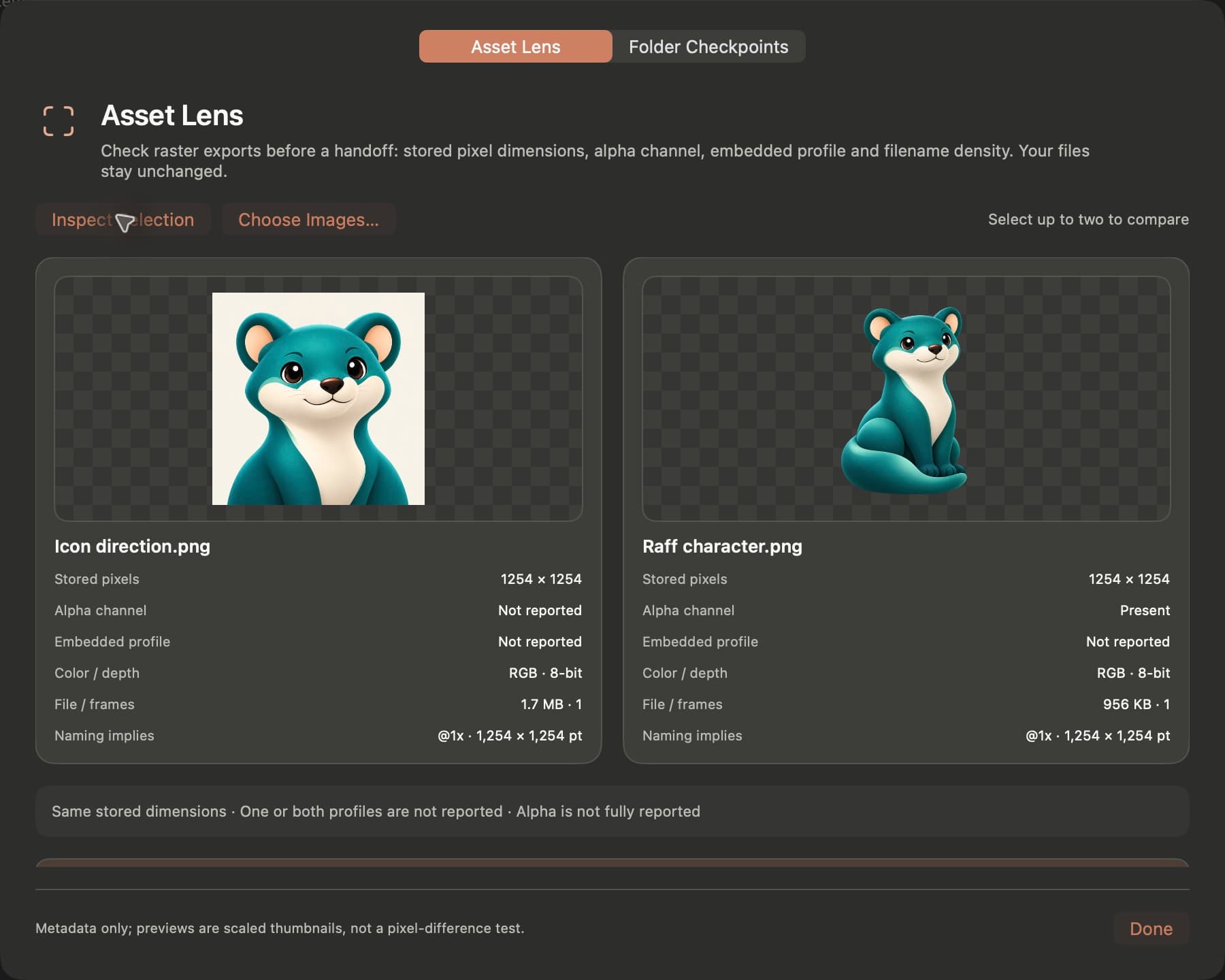
A first-release local tool for raster dimensions, alpha, colour profiles and @1x, @2x and @3x comparisons.
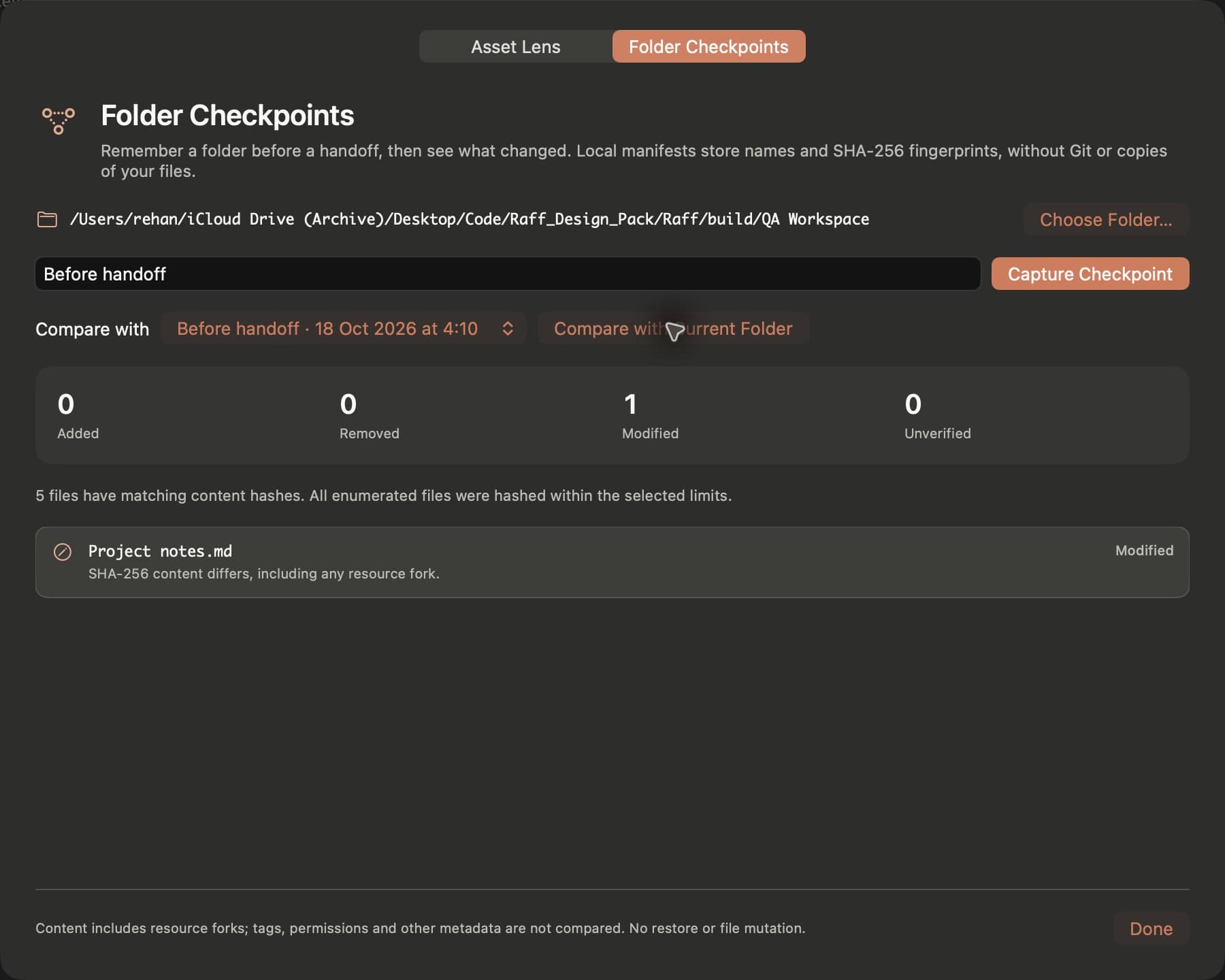
A first-release local tool comparing content fingerprints, with clear coverage for anything left out.
Two focused ways to review the files already on your Mac.
Browse your real Downloads by kind or Date Added. Groups are virtual filters; your physical folders stay distinct and nothing moves just because you open a group.
Packages, links, cloud-only items and incomplete downloads are shown with exclusions. File lengths are not guaranteed reclaimed space.
Review duplicates, installers, developer caches, Mail download copies, large files, application usage, older recordings, older downloads and app leftovers—with a reason and coverage for each.
Choose exact scopes and inspect the evidence. Age, size or a category label never establishes that a file is disposable. Selected items go through a separate Trash preview.
Verified content matches, within the hash budget. Keep one copy explicitly; tags and dates may differ.
From the first idea to the final handoff, keep your work close.
A brief in Documents. Assets on a drive. Exports somewhere else. Bring the useful parts together in a workspace, without rearranging your originals.
Click the folder to look inside
References bring things together. Originals stay where they belong.
Quick Look your files. Peek inside a folder. Use Asset Lens to check raster exports and compare their dimensions, alpha channels and reported colour profiles before a handoff.
Local inspection. Source files stay unchanged.
Capture a Folder Checkpoint before a handoff, then compare the content later. Review a tidy plan before moving files. And see what actually happened in Activity & Recovery.
Checkpoints compare files. Keep a separate backup for restoration.
Open a project in your installed editor or terminal. See read-only local Git status without leaving your files. Familiar shortcuts and an editable path keep the little things quick.
Native app handoffs. Local Git. No fetch or pull.
cursor .Open this folder in Cursor mainLocal Git status · read onlyReal folders. Familiar tools. A shorter path between them.
Asset Lens and Folder Checkpoints work locally. Optional filing suggestions start off and learn only from approved folders. You decide what feels at home.
A clear look at privacyWhat Raff includes, and what each feature is designed to do.
| Capability | In Raff | What to know |
|---|---|---|
| Everyday file views | Grid, list, columns, gallery, tabs and dual panes | File-changing commands require activation. |
| Smart Downloads | Virtual kind / Date Added groups and logical-size breakdown | Grouping changes the view. Tidy requires a preview. |
| Smart Clean | Nine scoped reviews with evidence and coverage | Partial or unrequested categories remain explicit. |
| Duplicates & Trash | Content matches, explicit keepers and a reviewed Trash plan | Recovery is conditional; permanently emptied items cannot be restored. |
| Finder Trash controls | Open Trash and a separately confirmed Empty Trash handoff | System permission may be needed. Permanent, no Undo; live integration unverified. |
| Asset Lens | Local raster metadata and export-density comparison | Image I/O formats; no profile or pixel editing. |
| Folder Checkpoints | Local content fingerprints and later change comparison | A comparison manifest, not a backup or restore point. |
| Workspaces & tools | Original-file references, sessions, installed editors and Git status | Git is read only; tools must be installed. |
| Desktop Shelves | Optional shelves over the real Desktop and existing wallpaper | Development preview; physical compatibility checks remain. |
The live download status identifies the packaged preview’s activation and notarisation state. Cleanup review never silently deletes files.
One payment. One Mac. A clearer place for your files.
 Yours for the everyday
The whole Raff experience, without another subscription.
Requires macOS 27+ on Apple silicon. File-changing commands require configured activation. Checkout shows the final amount before payment.
A little clarity goes a long way.
Support & setup
The preview supports browsing, local inspection and recovery of eligible operations. File-changing commands remain locked until configured activation is available. Changing files will require a valid licence.
Yes. Raff is built with SwiftUI and AppKit and works with the real files and folders on your Mac. It requires macOS 27 or later on Apple silicon. The current download is a development preview.
Raff is designed for everyday file management: navigation, previews, tabs, dual panes and real file operations. You can optionally set it as the folder-opening app where macOS supports that. Finder stays available for system responsibilities; other apps’ Open and Save panels remain controlled by macOS.
No. A workspace gathers references to originals in different folders. Adding or removing a reference leaves the original alone. File actions that move an original are separate and clearly labelled.
Grouping by kind or Date Added only filters the view. Physical folders remain distinct. A separate Tidy preview shows proposed file moves and exclusions before you approve them. Missing Date Added metadata stays unknown, and logical file sizes are not guaranteed disk-space savings.
No. Every category reports its chosen scope, evidence and checked, partial, not included or unavailable coverage. Nothing is preselected. Duplicate removal requires an explicit keeper; selected files are revalidated before a separate Trash preview. Age and size do not establish that a file is disposable.
Open Trash opens Finder without removing anything. Empty Trash is a separate, confirmed Finder handoff: it can permanently remove all Finder Trash, not just Smart Clean selections, and Raff cannot undo it. macOS may require Automation permission. File operations stay paused until you check that Finder has finished or cancelled; the live Finder permission and Empty Trash path remain a release check.
Desktop Shelves display your real Desktop folder, grouped by kind. Rearranging shelves changes the layout, not the file locations. Desktop mode is an optional preview; check your displays, widgets, Spaces and Stage Manager before relying on it.
A lifetime licence to use Raff on one Mac, paid once. There is no recurring subscription. Keep your licence key from the purchase receipt and activate it in the app. You can deactivate the old Mac before moving your licence to another one. Checkout shows the final amount before you pay.
Everyday file browsing and local creative tools do not require a Raff account. A purchased licence needs an internet connection for activation and periodic entitlement renewal. Your files are not uploaded for Asset Lens or Folder Checkpoints.
No. A checkpoint records names, metadata and bounded content fingerprints so you can compare changes. It does not store a copy of your file contents or restore files. Packages, links, placeholders, dependency folders and scan limits are explicitly excluded or marked unverified.
Activity & Recovery records actual item outcomes, including interrupted work. Undo and Trash restoration are conditional: Raff rechecks the files and refuses to overwrite later changes. Keep a separate backup for important work.
Start with the files you already have.